Run your first Drop

Hold your spot. Skip the campout.

Dibs is a virtual line for limited-stock launches. Scan in at the store's door or join from nearby, wait anywhere, and walk up when the counter calls you.

For stores: early access now. For buyers: the app isn't in the App Store or Google Play yet.

Your place in line

Live

7 ahead of you

The store is calling

Entry code
D-014
Spots left
3
Your limit
2

Play the store's side:

Wait anywhere

A buyer's whole launch day, in six screens from the Dibs app. Your number is real: the plates show exactly how many people are ahead of you, and they only move when the store calls.

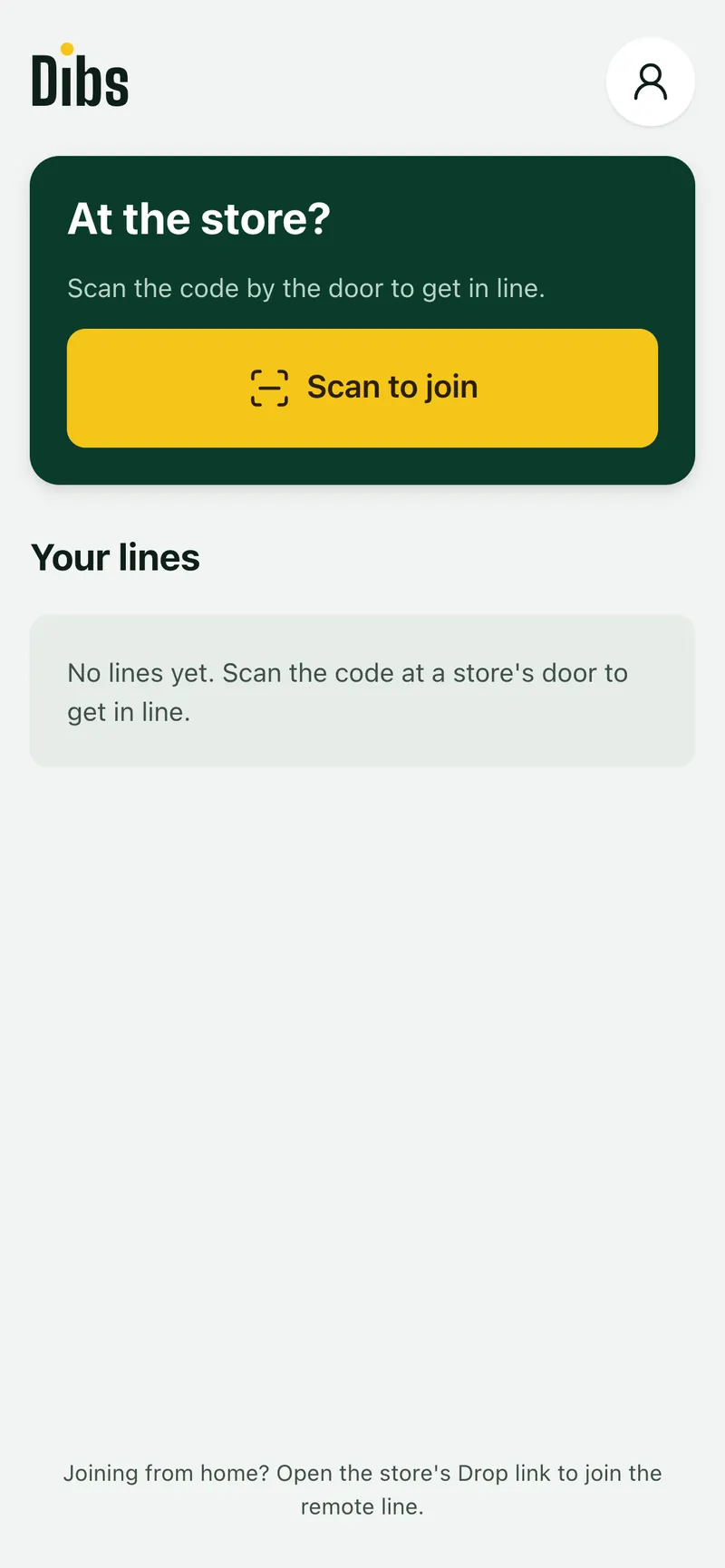
  1. Scan the door code, or join from nearby

    At the store, tap Scan to join and point your camera at the code on the store's tablet. If the store opened a remote line, you can join it from the Drop's page instead, within the store's radius.

    Dibs app home screen: a green 'At the store?' card with a yellow Scan to join button.
  2. Get a spot, a waitlist place or a draw entry

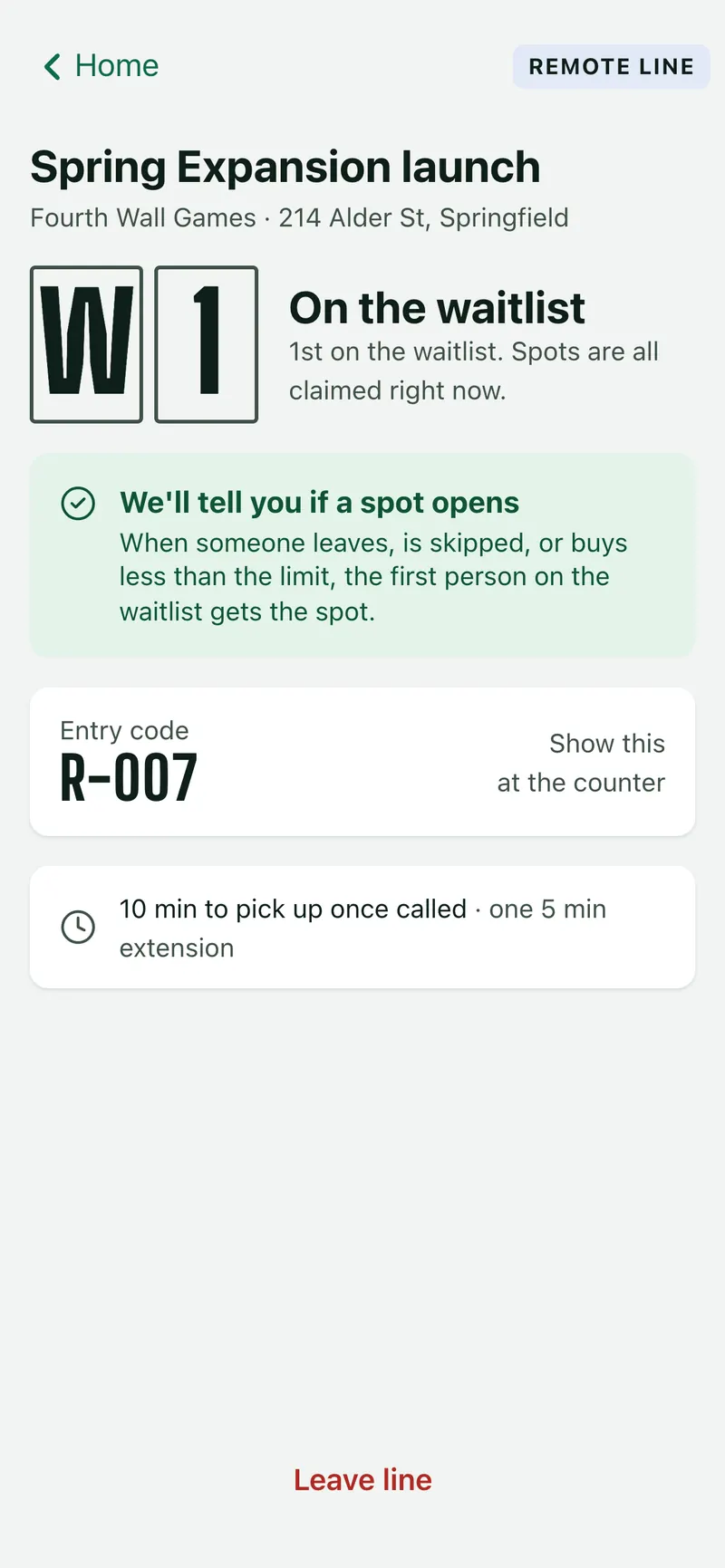
    A spot holds real stock, up to the per-person limit. When the spots are gone you can still take a waitlist place, and move up if someone leaves or is skipped. Remote lines can use a draw instead: you're entered until the draw time.

    Entry screen showing hollow plates W and 1: first on the waitlist, entry code R-007.
  3. Wait anywhere, with your live position

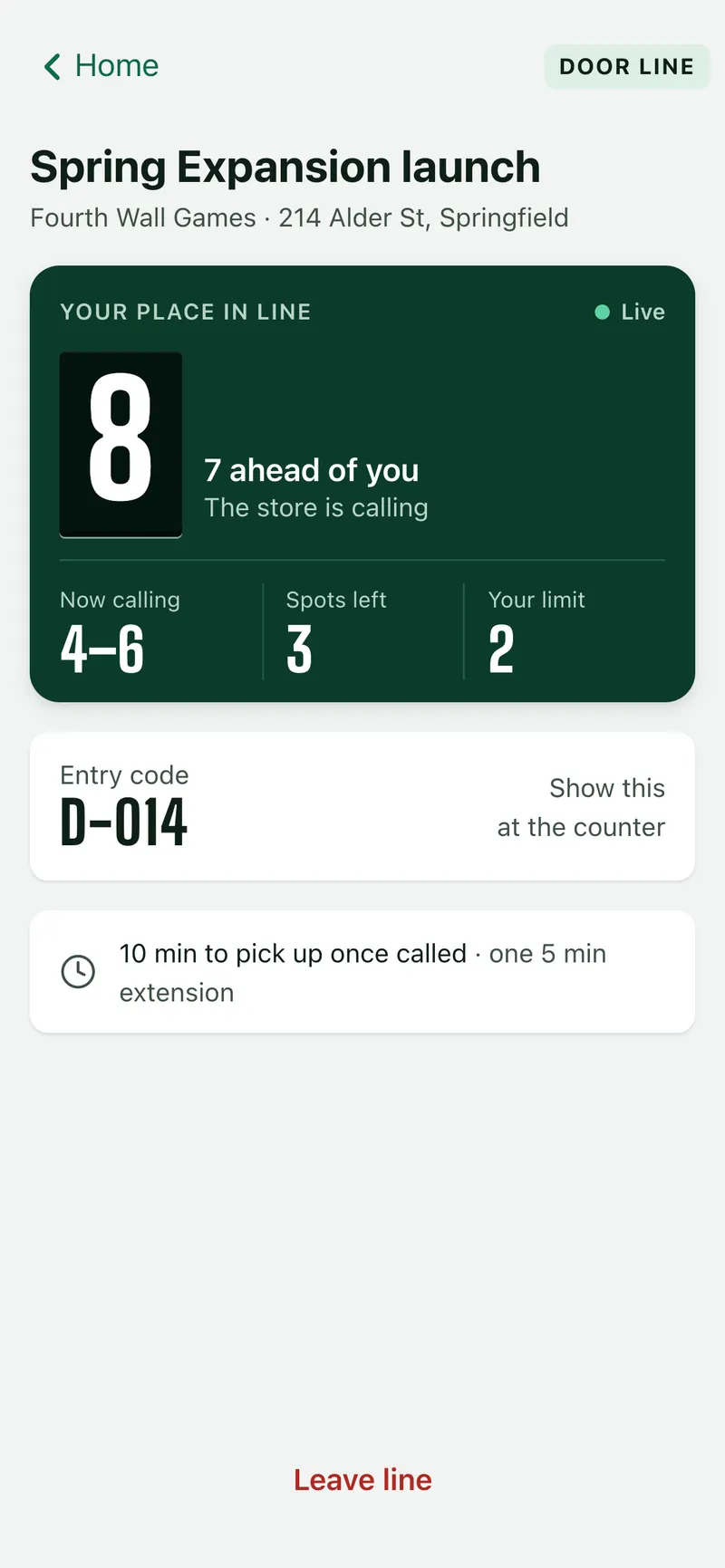
    Your place shows on the plates and updates as the line moves, without a refresh. Get a coffee. Sit in the car. Your entry code is what the counter looks for.

    Entry screen: position 8 on a dark plate, 7 ahead of you, the store is calling, entry code D-014.
  4. Get the push when you're called

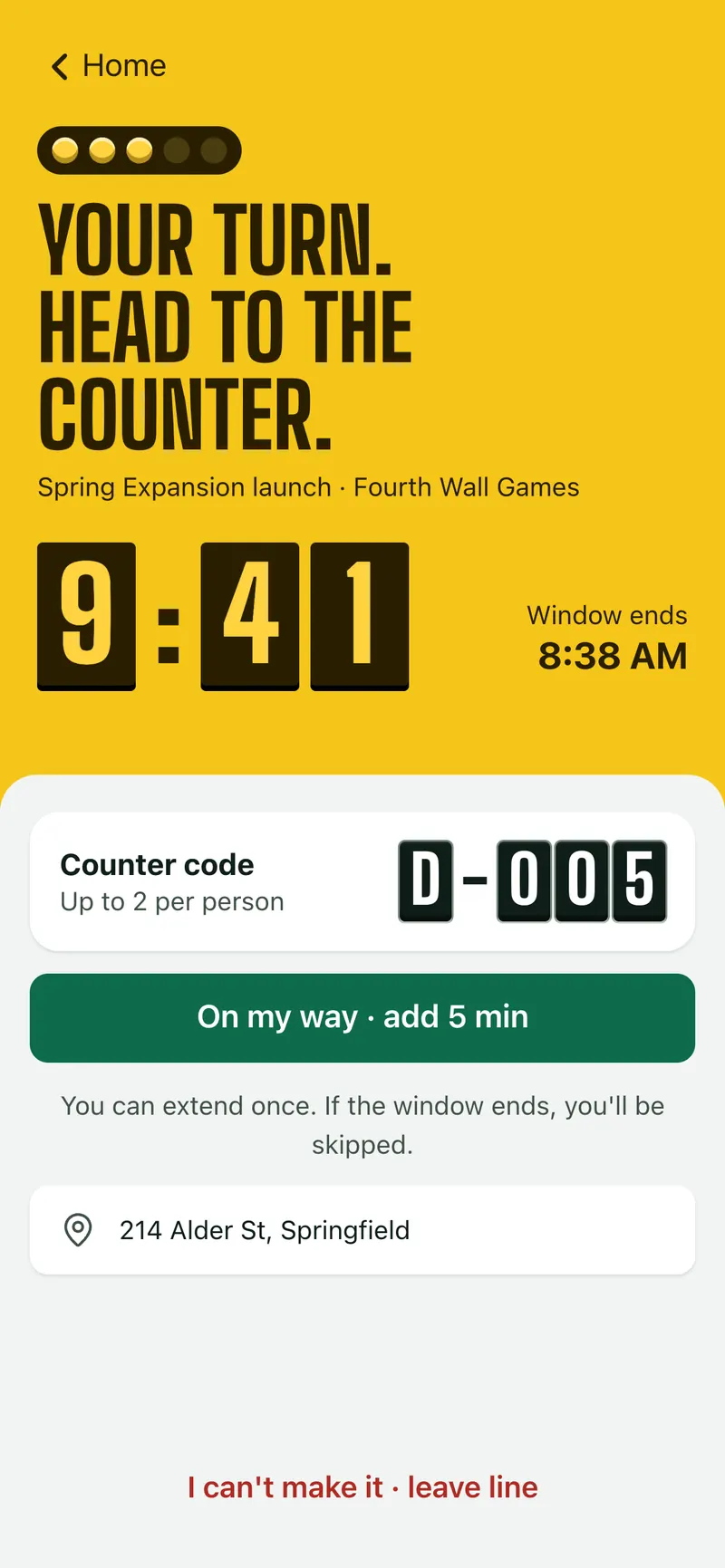
    The moment the store calls you, a notification says it's your turn and when your pickup window ends. Tap it and the screen turns lamp yellow with your countdown.

    Dibs

    Spring Expansion launch: it's your turn

    Come to the counter with code D-005. Your window ends 8:38 AM.

    Called screen in lamp yellow: Your turn. Head to the counter. Countdown 9:41, window ends 8:38 AM, counter code D-005.
  5. Running late? Tap "On my way"

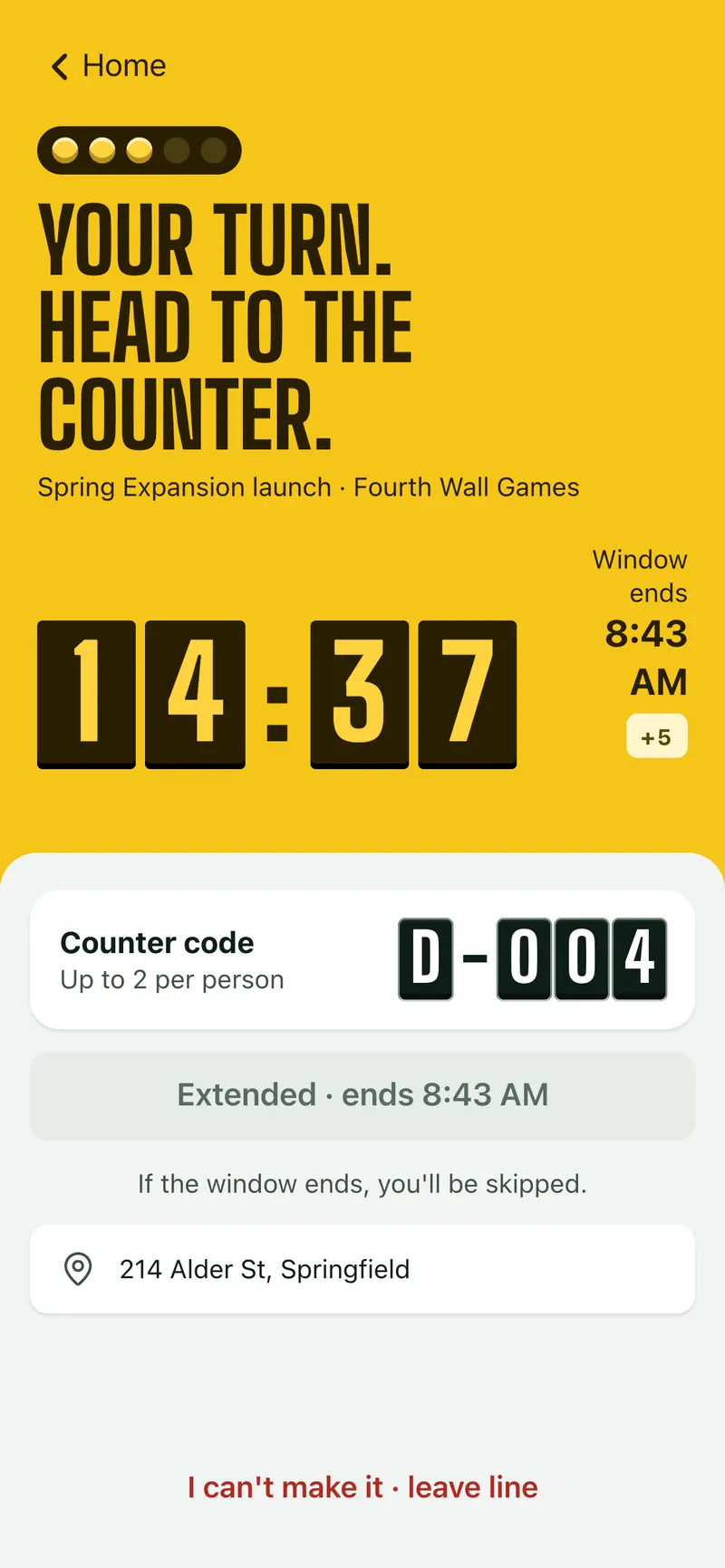
    You can extend your window once, by the time the store set (5 minutes here). The counter sees that you're on your way.

    Called screen after extending: countdown 14:37 with a +5 chip, button reads Extended, ends 8:41 AM.
  6. Pick up at the counter

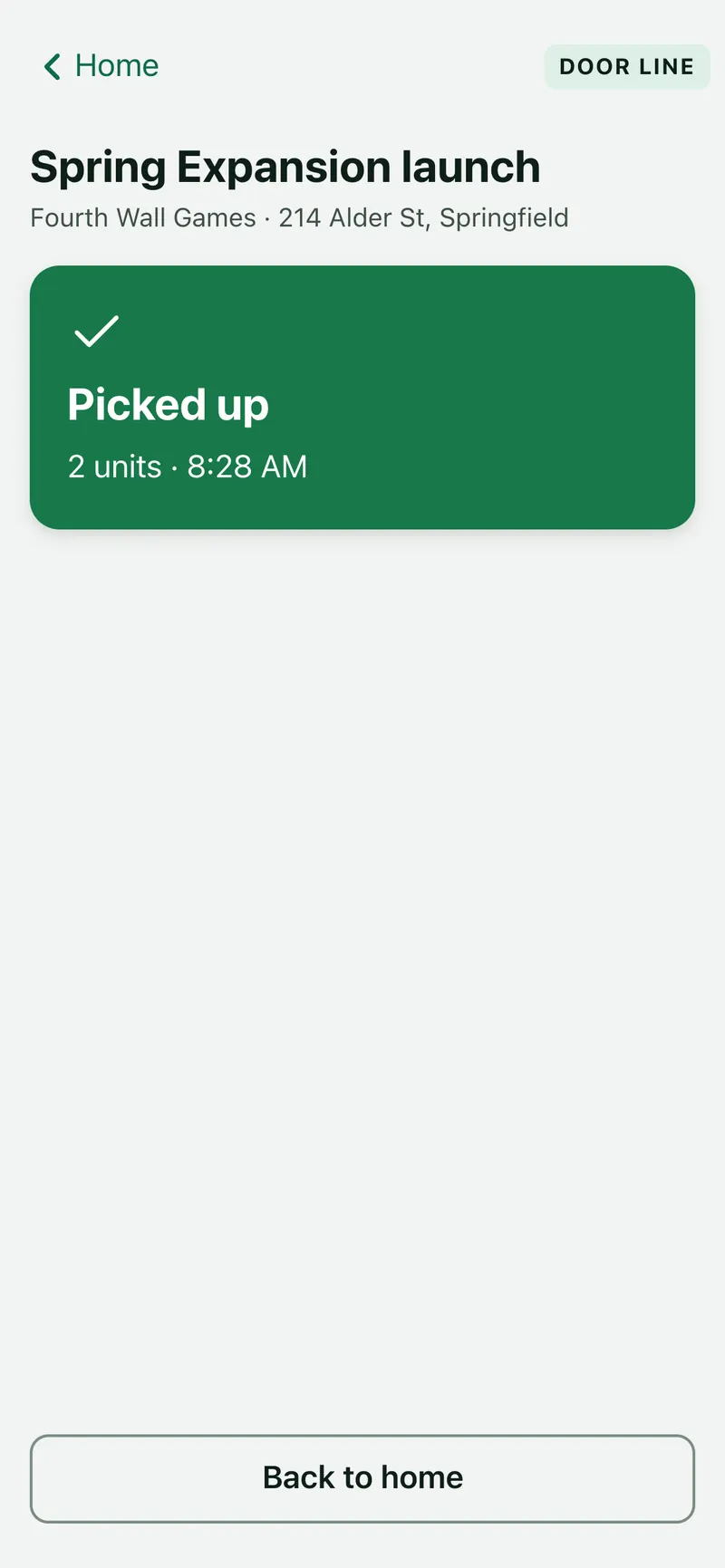
    Show your code. The store marks your pickup with the quantity you took, and your entry turns green. Anything you didn't take goes back to the line.

    Entry screen in green: Picked up, 2 units, 8:26 AM.

The counter decides

Set up a Drop on your desktop the day before. Run it on launch day from a counter tablet, a phone or the desktop console. Nothing is called until you press Start.

  1. Create a Drop

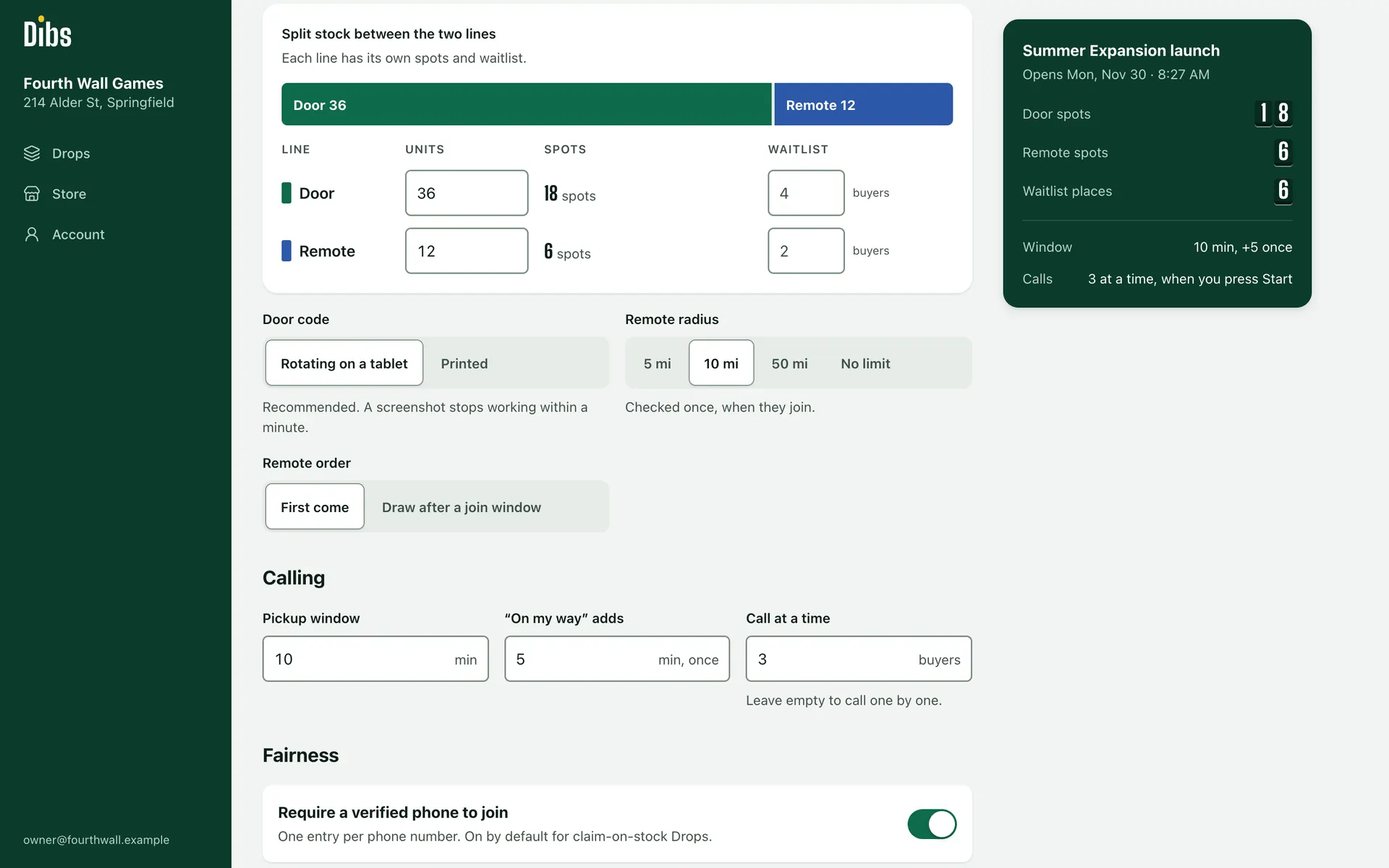
    Name it, set when the line opens, your stock and the limit per person. Dibs works out the spots as you type: 48 units at 2 each is 24 spots. Split them between a door line and a remote line, each with its own waitlist.

    Drop form: 48 units split into Door 36 (18 spots, waitlist 4) and Remote 12 (6 spots, waitlist 2), door code Rotating on a tablet, remote radius 10 mi, pickup window 10 min.
  2. Put the code on the door

    Kiosk mode turns a tablet into the door: a QR that changes every 30 seconds and the spots left in the door line. Or print a fixed code; buyers then also have to be within about 150 m of the store.

    Kiosk on a tablet: Scan to get in line, three steps, a large QR code with a yellow bar draining toward the next code, 2 spots left in the door line.
  3. Press Start when you're ready

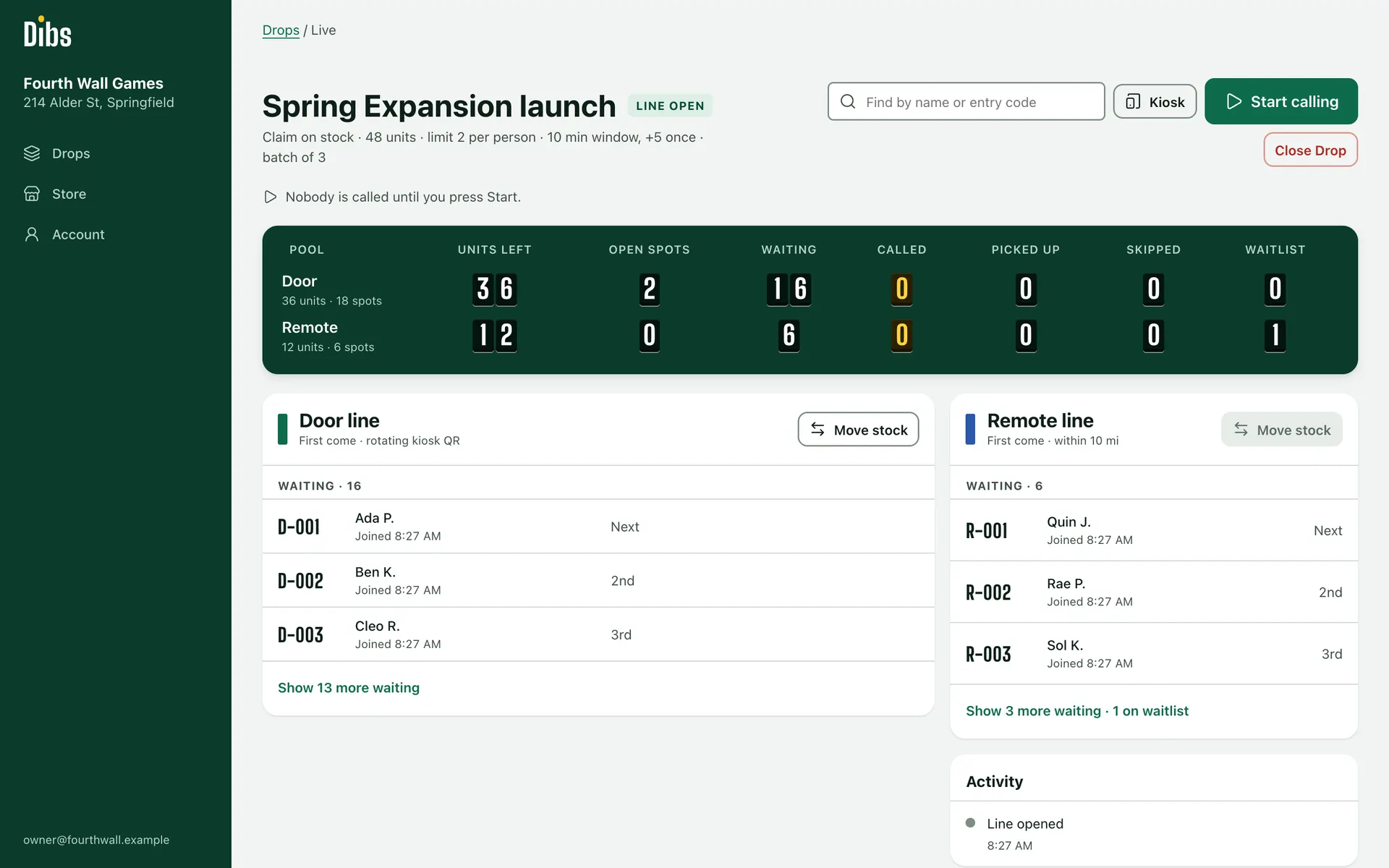
    The line opens on its own at the time you set, so buyers can get in. Calling doesn't. The line score fills up while you get the counter ready.

    Live console before calling: line score for door and remote pools and a Start calling button.
  4. Call one, or a batch

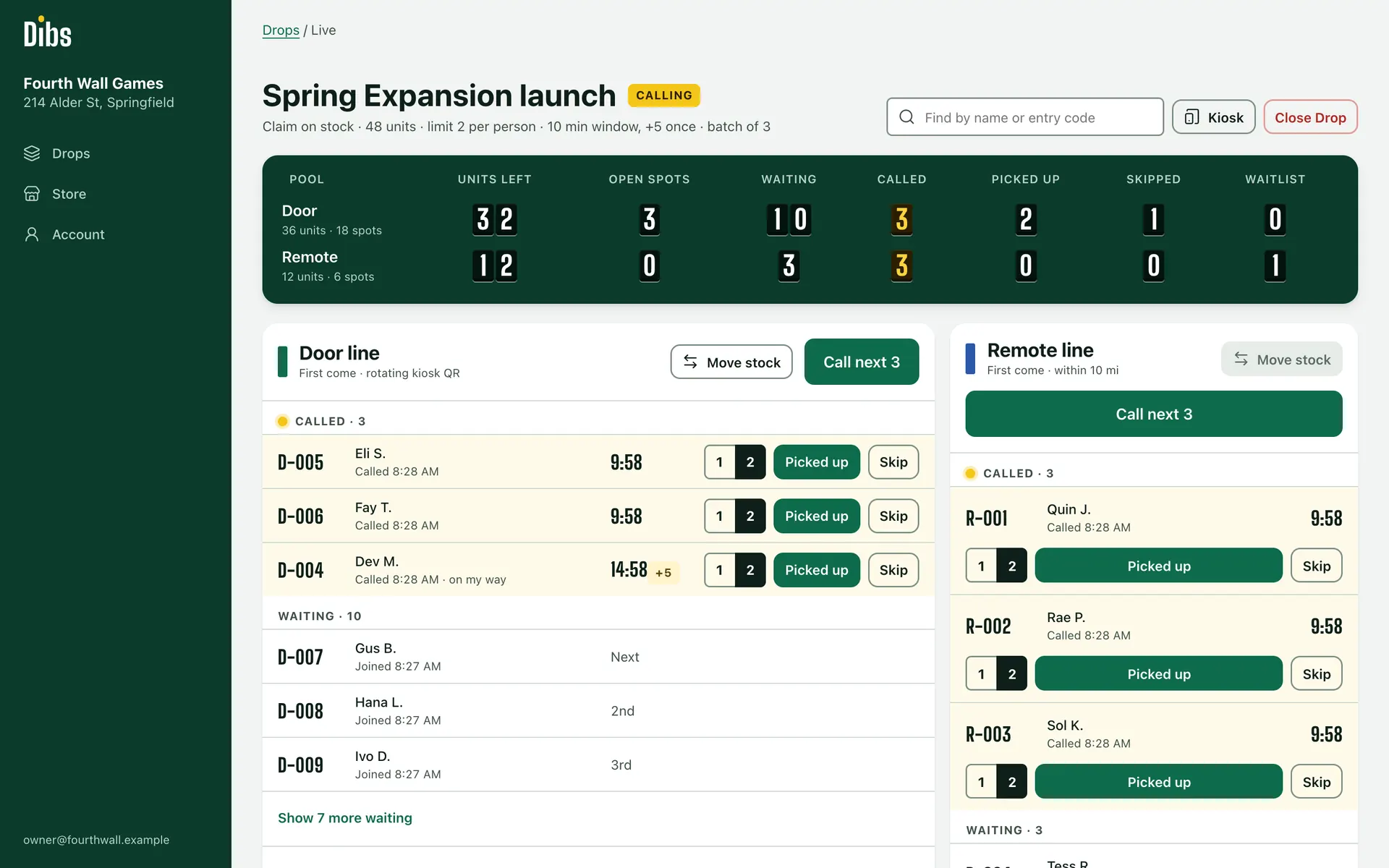
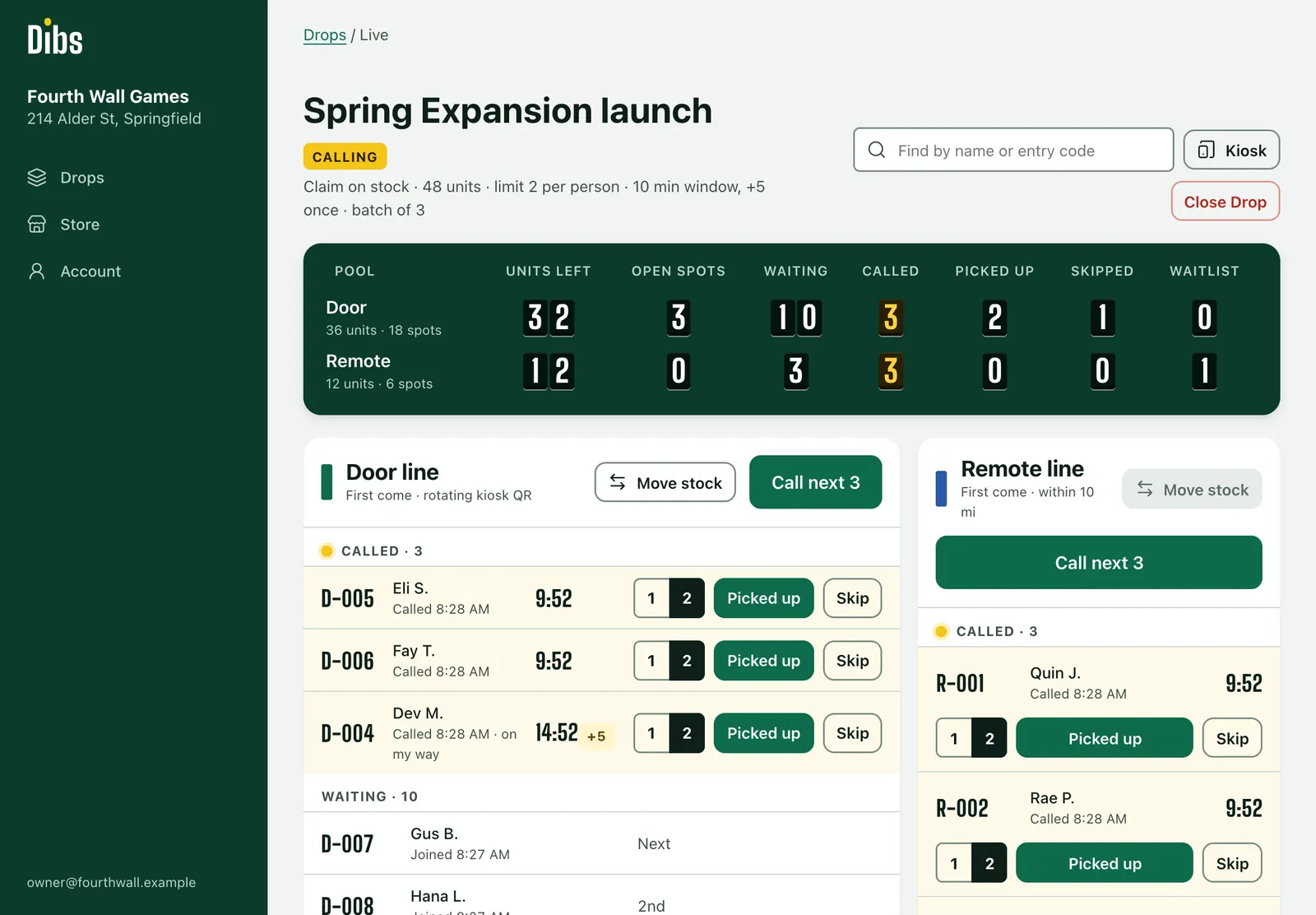
    Call the next buyer, or the next 3 if you set a batch size. Each called buyer gets a pickup window, and you see every countdown, with a +5 when someone's on the way.

    Live console while calling: three called door entries with countdowns and Picked up and Skip buttons, ten waiting.
  5. Mark pickups, undo, move leftovers

    Tap Picked up with the quantity taken. Undo a mistake until the Drop closes. Find anyone by name or entry code. If one line runs dry, move its unclaimed stock to the other and the waitlist moves up.

    The console on a counter tablet with large Picked up buttons.
  6. Sold out, and closed

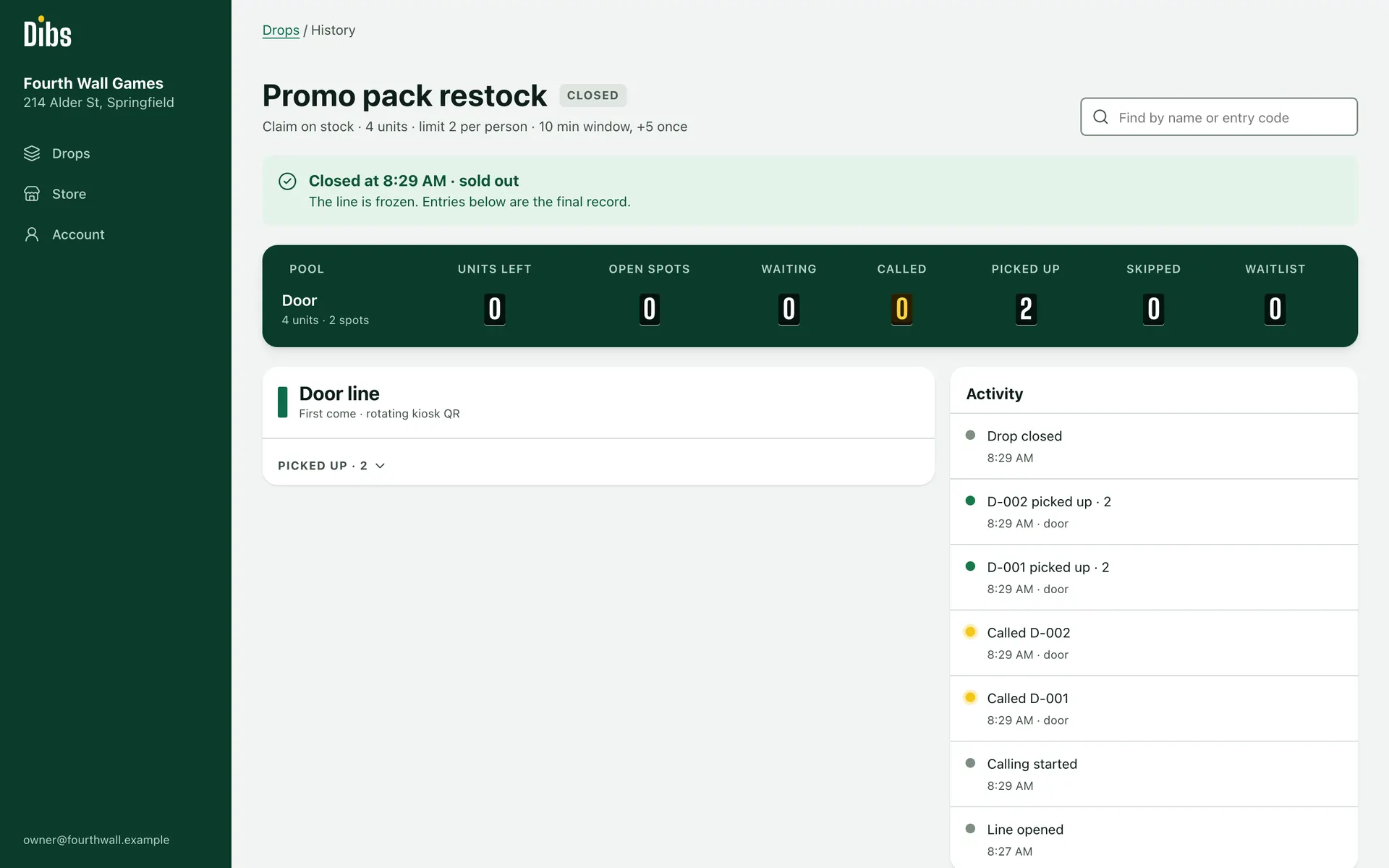
    When every unit is claimed and nobody is waiting, the Drop closes itself and anyone still on a waitlist is told. You can also close early at any time.

    Console for a closed Drop: line score frozen, everything picked up, banner says closed, sold out.

Fair, and it says why

A line only works if one place means one real person who showed up. These are the rules every Drop runs on.

Two kinds of line

Pick one per Drop. Calling, windows, skips and pickups work the same.

Claim on stock

Each spot holds real units, up to the per-person limit. The line closes when the stock is claimed, apart from a small waitlist. Built for launches.

Stock count
Yes, split per line
Limit per person
1 or more
Waitlist
Yes, per line
Quantity at pickup
1 up to the limit
Verified phone
On by default

24 spots

Turn at the counter

No stock count and no cap: a spot is just your place in line, and everyone who joins gets a turn at the counter.

Stock count
None
Limit per person
None
Waitlist
Not needed
Quantity at pickup
Not asked
Verified phone
Off by default

Join from down the road

A remote line lets buyers join from the app without coming to the door. The store picks how far.

Remote radius

Buyers within 5 miles of the store can join. Their location is checked once, when they join, and never after.

Buyers within 10 miles of the store can join. Their location is checked once, when they join, and never after.

Buyers within 50 miles of the store can join. Their location is checked once, when they join, and never after.

Anyone can join the remote line, without sharing their location at all.

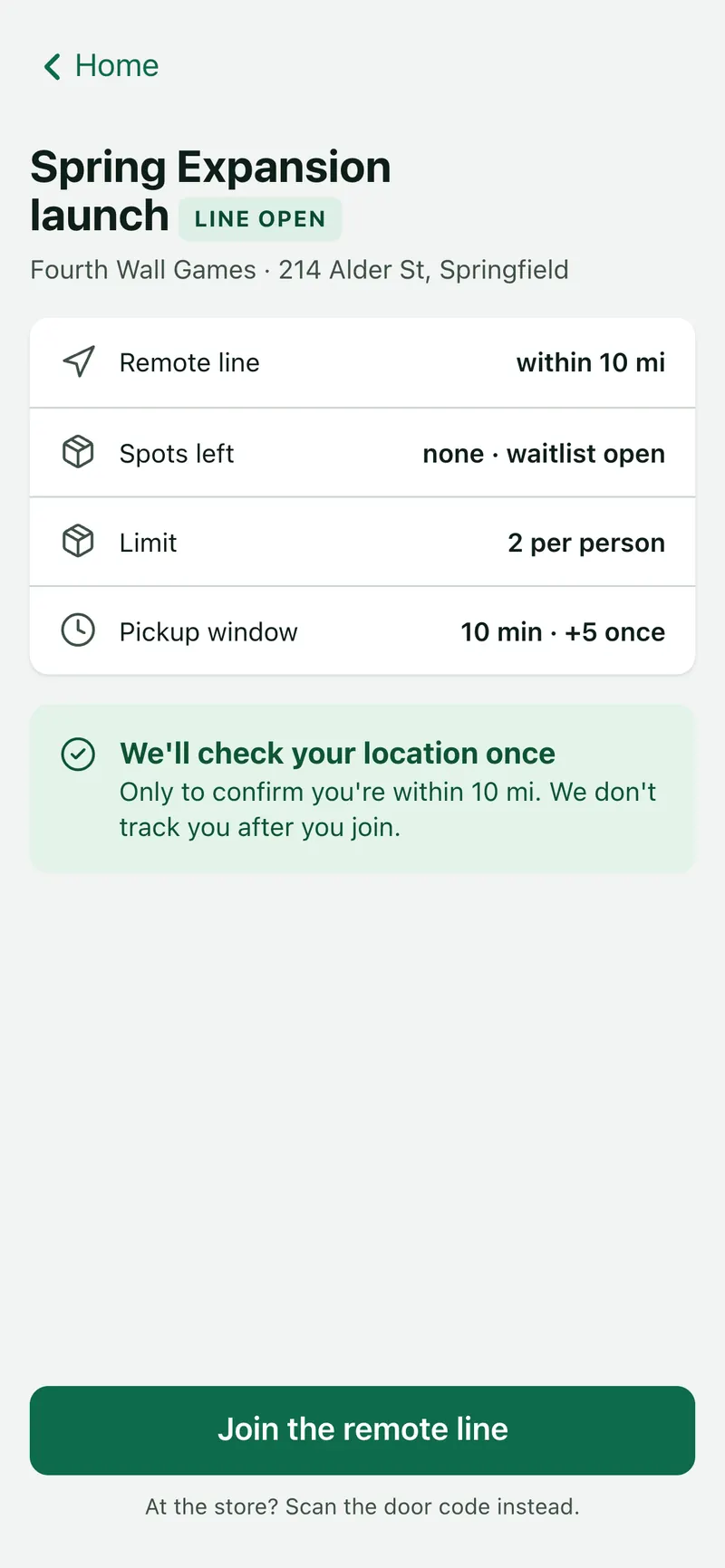
Too far? The app says how far: "You're 12.4 mi from the store."

Join screen for the remote line within 10 mi: spots left, limit 2 per person, a note that location is checked once, and a Join the remote line button.

Questions

What if I miss my pickup window?

Before your window ends you get a reminder, with the "On my way" extension if you haven't used it. If the window ends before the store marks your pickup, you're skipped and your spot goes to the next person. You'll get a notification saying so, and whether there's room to rejoin.

Can I rejoin after I'm skipped?

Yes, in the same line, at the back, as long as it still has a free spot or waitlist room. If it's full, the app tells you. You can also leave a line yourself any time before pickup, and your spot goes to the next person.

Do I need the app?

Yes. Buyers join only in the Dibs app for iPhone and Android, and that's where the notifications come from. If you scan a door code without the app, your phone opens the app store; install Dibs, sign in, tap Scan to join and scan the code again. Dibs isn't in the stores yet; leave your email below to hear when it is.

What if my phone dies while I wait?

Your place is held by Dibs, not by your phone, and you stay signed in when you restart the app. But your turn arrives as a notification with a pickup window, so keep your phone charged: if the window ends before you pick up, you're skipped. At the counter, the store can find your entry by your name or entry code.

How do I sign in?

With Apple, Google or your phone number and a one-time code, inside the app. Some Drops ask for a verified phone number before you join; phone codes go to US numbers only for now.

Does Dibs track where I am?

No. For a remote line with a radius, or a printed door code, your location is checked once, when you join. It isn't checked after that. Remote lines with no limit don't ask for it at all.

Will Dibs send me other notifications?

Only about lines you're in: when you're called, when your window is ending, if you're skipped, if you move off a waitlist or get a draw result, and when a line sells out or closes. No marketing pushes.

Stores: can I change a Drop after the line opens?

The line mode, join methods and per-person limit lock when the line opens. The pickup window and batch size stay editable and apply to the next call. You can move unclaimed stock between lines, and close the Drop at any time.
Run your first Drop

Dibs is getting ready for its first stores. Tell us about yours and we'll email you about early access.